Exploring the Travanco Google Slides Template for Modern Presentations
In today's fast-paced professional world, the quality of a presentation can significantly impact outcomes. Whether pitching to investors, showcasing a portfolio, or outlining a company profile, the visual foundation of your slides matters. Among the many templates available, Google Slides - Travanco presents itself as a versatile option designed for a broad range of uses. Understanding its features, limitations, and ideal application scenarios can help you determine if it aligns with your specific needs.
What is the Travanco Google Slides Template?
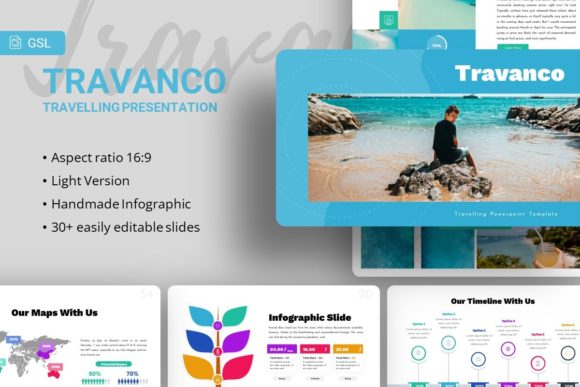
Google Slides - Travanco is a pre-designed presentation template available for use within Google Slides. It is marketed as a multipurpose solution suitable for creative agencies, corporate business profiles, personal portfolios, photography showcases, pitch decks, and startup presentations. The template package comes with a set of 35 distinct slides, each built to cover different aspects of a typical presentation narrative.
Its distinct characteristics include handcrafted infographics, pixel-perfect illustrations, and a design based on master slides for consistent formatting. A notable practical feature is the inclusion of picture placeholders that support drag-and-drop functionality, aiming to streamline the process of customizing visuals. All graphical elements are described as resizable and editable, providing flexibility within the Google Slides environment. The core files included are a PowerPoint .PPTX file (which can be imported into Google Slides), a documentation file, and a set of vector icons.
Core Features and Practical Utility
The promise of 35 slides for each template offers a comprehensive starting point. For someone building a presentation from scratch, this volume can reduce the initial time investment significantly. The slides are likely structured to cover titles, team introductions, service breakdowns, data visualization, portfolios, and conclusion sections.
Customization and Design Integrity
The emphasis on "easy customizable contents" and "master slide" basis is key. In practice, a template built on master slides allows for global changes to fonts, colors, and backgrounds, ensuring visual coherence across the entire presentation when you modify core elements. This is a strong advantage for non-designers who need to maintain a professional look.
The handcrafted infographics and pixel-perfect illustrations suggest an attention to detail that can elevate a presentation beyond simple text and bullet points. These elements are intended to make complex information more accessible. However, their utility depends heavily on how well they match your specific data. While resizable and editable, altering complex infographics without design skills may present a challenge.
Considering the Trade-offs and Limitations
No template is universally perfect, and understanding the trade-offs of Google Slides - Travanco is crucial for making an informed choice.
A primary consideration is the platform itself. Google Slides - Travanco is provided as a .PPTX file, implying it was originally designed in PowerPoint. While Google Slides can import such files, there can sometimes be minor formatting discrepancies or font compatibility issues during conversion. Users deeply invested in the pure Google Slides ecosystem might find this a slight friction point.
The product note clearly states that all demo images are for preview only and are not included. This is common in the template market, but it means users must supply their own high-quality photography or imagery. The drag-drop picture placeholder is a helpful feature, but the final aesthetic result will entirely depend on the user's own image assets.
Scope of Use Versus Specificity
The template's broad claim of suitability for "any variety of purposes" is both its strength and its potential weakness. A generic, multipurpose template like Travanco offers great flexibility. You can adapt it for a corporate report one month and a personal photography portfolio the next. This makes it a cost-effective and time-saving resource for individuals or small businesses with diverse presentation needs.
However, this generality can be a limitation when a highly specific, industry-tailored aesthetic is required. For example, a cutting-edge tech startup might seek a template with a more avant-garde, minimalist feel, while a luxury brand portfolio might need richer, more bespoke visual metaphors. In such cases, Google Slides - Travanco, with its balanced corporate-creative design, might feel too neutral or not distinctive enough. The trade-off is clear: versatility sometimes comes at the expense of niche impact.
Comparing the Decision Factors: When is Travanco the Right Fit?
Choosing a presentation template often hinges on a few key decision factors: time, design skill, required professionalism, and presentation context.
Google Slides - Travanco appears best-fit for users who:
- Need a professional baseline quickly: If you have a tight deadline and lack the time to design every slide from a blank canvas, the 35-slide structure provides a ready-made framework.
- Possess moderate customization skills: The template is designed to be editable. Users comfortable with basic tasks like swapping text, replacing images, and changing colors in Google Slides will likely maximize its value.
- Operate across multiple presentation types: Freelancers, consultants, or small agency owners who regularly create different kinds of presentations (e.g., client pitches, company profiles, project reports) benefit from a single adaptable template.
- Value cohesive design without deep design expertise: The master slide system and pre-built infographics help maintain a consistent, polished look that might be difficult to achieve independently.
When You Might Need Another Option
Conversely, Google Slides - Travanco might not be the optimal choice under certain circumstances.
- When seeking extreme niche or brand-specific aesthetics: If your brand identity demands a very unique visual language that breaks from standard corporate or creative templates, a more custom design solution is necessary.
- When working exclusively with complex animation and interactivity: Google Slides has inherent limitations regarding advanced animations. If your presentation relies heavily on dynamic transitions and interactive elements, other specialized software or templates might be more appropriate.
- When the presentation requires deep data visualization: While the template includes infographics, they are generic. Presentations dominated by complex, real-time data charts might require a template built specifically for data-heavy fields or integration with more powerful charting tools.
Evaluating the Overall Value Proposition
The value of Google Slides - Travanco lies in its function as a bridge between a blank document and a hired designer. For a modest investment, it provides a structured, visually competent starting point. The included documentation file and vector icons further add to its utility by offering guidance and additional graphical resources.
It is important to approach such templates with a realistic mindset. They are tools to accelerate and enhance your work, not magical solutions that guarantee success. The final presentation's effectiveness will still depend overwhelmingly on your content, narrative flow, and delivery. Google Slides - Travanco gives you a solid visual stage, but you remain the playwright and actor.
In the broader landscape of presentation resources, this template sits in the category of multipurpose, professionally-oriented designs. Its direct comparison points would be other similarly priced, multi-use templates within Google Slides or PowerPoint. Its distinguishing features—the 35-slide count, handcrafted infographics, and master slide foundation—are the specific details to weigh against alternatives.
For many professionals aged 20 to 50 who are comparing options, exploring alternatives, and seeking a practical resource to improve their presentation efficiency, Google Slides - Travanco represents a credible contender. It mitigates the common pain points of starting from scratch and inconsistent design. By critically assessing its features against your own regular needs, skill level, and desired presentation impact, you can make a more informed decision on whether this template is a helpful resource for your toolkit or if your search for the right presentation solution should continue elsewhere.