Introducing the Companix Presentation Template
In the world of business, a presentation is often your first, and most critical, point of contact with clients, investors, or stakeholders. A well-designed, professional slide deck communicates competence, clarity, and credibility. The Presentation Template - Companix is a PowerPoint solution designed to serve as a foundational tool for creating such presentations. It is a pre-designed set of 35 slides that users can customize to build decks for a wide array of purposes.
What is the Companix Presentation Template?
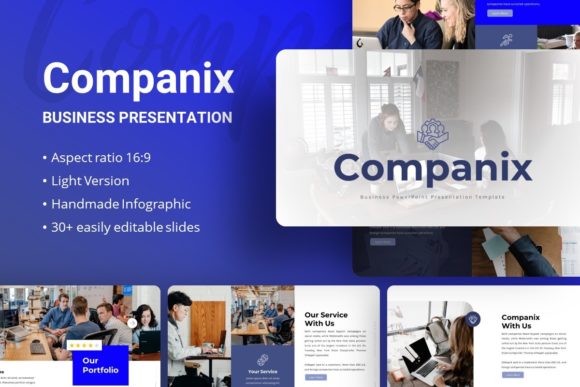
The Companix template is a downloadable PowerPoint (.PPTX) file. It is not a software or a service, but a digital product—a structured design framework. The core offering is a collection of slide layouts. As described, its applicability spans creative agency pitches, company profiles, corporate reports, portfolios, photography showcases, startup pitch decks, and even personal portfolios. The template comes with additional resources: a documentation file for guidance and a set of vector icons. It is important to note that the dramatic demo images shown in promotional materials are for preview only and are not included in the actual download; users must supply their own imagery.
The design features are geared towards ease of use and visual professionalism. It is built using PowerPoint's Master Slides, which means global changes to fonts and colors can be made efficiently. The template includes handcrafted infographics and pixel-perfect illustrations, all declared as resizable and editable. For content insertion, it utilizes picture placeholder functionality, allowing users to drag and drop their own images directly into the slides.
Potential Reasons for Interest
Individuals or teams might consider the Companix template for several practical reasons. First is time efficiency. Designing a polished presentation from a blank slide requires significant time and design skill. A template provides a ready-made structure, drastically reducing the time from concept to finished deck. Second is design consistency. For users without formal graphic design training, achieving a cohesive, professional look across dozens of slides is challenging. The template ensures visual harmony through its pre-coordinated layouts, color schemes, and typography.
Third is versatility. The advertised suitability for multiple scenarios—from corporate business to personal portfolio—suggests a flexible design system. A user or small company that needs to create different types of presentations might find value in a single, multipurpose asset. Finally, there is the consideration of cost. Compared to hiring a freelance designer for each presentation need, purchasing a template is often a lower upfront investment.
Benefits, Tradeoffs, and Key Considerations
The primary benefit of the Companix Presentation Template is its function as a design accelerator. It provides a starting point that is far ahead of a blank document. The use of Master Slides and easy customization features like drag-and-drop placeholders empowers users to focus more on their content and message rather than on layout and alignment. The inclusion of custom infographics and illustrations can help visualize data and concepts more engagingly than standard PowerPoint charts.
However, several tradeoffs and considerations are essential for a balanced evaluation. The most prominent is the dependency on user skill. While the template is designed to be easy to use, it still requires a fundamental understanding of PowerPoint to customize effectively. Altering complex infographics or resizing illustrations without distorting them may require a moderate level of proficiency. The claim of "easy customizable contents" is relative to the user's experience with the software.
Another consideration is the generic nature of templates. While versatile, a template must cater to a broad audience, which can sometimes result in a design that feels less unique or perfectly tailored to a specific brand identity. Users may need to invest additional time customizing colors and fonts to match their exact corporate branding beyond the initial setup.
A practical expectation to set is regarding the image assets. The explicit note that demo images are not included is crucial. The final presentation's visual impact will heavily depend on the quality of the user's own photographs and graphics. The template provides the frame, but the user must supply the artwork. Furthermore, while 35 slides offer a robust starting library, a very long or highly specialized presentation might require creating new slides outside the provided layouts.
Situations Where Companix is a Strong Fit
The Companix Business Presentation Template could be a highly suitable choice in specific scenarios. It aligns well with the needs of small businesses, startups, and freelancers who require professional-looking presentations but lack in-house design resources or large budgets for custom design. For a startup preparing its first investor pitch deck, this template offers a quick path to a credible visual foundation.
It is also a strong fit for individuals or teams within larger organizations who need to produce internal or client presentations efficiently, without always engaging the corporate design department. Marketing professionals, project managers, or consultants who regularly assemble reports and proposals could leverage it as a personal productivity tool.
The template's wide range of suggested uses indicates it may work best for general business and portfolio presentations rather than highly technical or niche subjects. If your content revolves around company introduction, service offering, project showcases, team profiles, and financial highlights, the included slide types are likely to cover those needs.
When Alternatives Might Be Worth Considering
Despite its versatility, alternatives to the Companix template should be explored in certain situations. If your organization has a strict, complex brand guideline with specific colors, fonts, and layout rules that cannot be easily adapted to a pre-made template, a custom-designed deck or an internally developed corporate template might be necessary to maintain brand integrity.
For presentations requiring advanced interactive elements, complex animations, or non-standard visualizations, standard PowerPoint templates, including Companix, may be limiting. Specialist software or more advanced custom design might be required. Similarly, if the presentation will be delivered across various platforms beyond PowerPoint (like web embedding or video), the native PowerPoint format might not be the ideal starting point.
Another alternative path is the use of subscription-based presentation software like Canva or specialized online tools. These platforms offer template libraries within their ecosystems, often with cloud collaboration features. They might be preferable for teams that prioritize collaboration, need to access designs from anywhere, or prefer a simpler, web-based interface over desktop PowerPoint.
Finally, if the presentation need is extremely simple or one-off—such as a brief internal update—the time invested in learning and customizing a template might not justify the benefit. Using PowerPoint's built-in basic templates or even a clean, minimal self-made design could suffice.
Practical Decision-Making Insights
To determine if the Presentation Template - Companix aligns with your goals, conduct a simple self-assessment. First, evaluate your proficiency and comfort with PowerPoint. If you are confident in tasks like changing master slides, editing shapes, and using placeholders, you will likely unlock more value from the template. If you are a beginner, consider whether you have the time to learn these functions alongside your presentation deadline.
Second, audit your typical presentation content. List the common sections and slide types you need. Compare this list to the template's advertised features—35 slides with infographics and illustrations for business, portfolio, and pitch purposes. If your needs fall within these categories, the fit is good. If you frequently need very specialized slides (like detailed engineering schematics or legal contract excerpts), assess if the template's editable graphics can be adapted to serve that purpose.
Third, consider your asset readiness. Do you have a library of high-quality photos, logos, and graphs ready to drag into the placeholders? The template's output quality will be a combination of its design and your assets. If your image library is weak, the template's benefit may be diminished unless you also budget for sourcing new images.
Ultimately, the Companix template is a tool, not a solution. Its value is derived from the user's content, skill, and specific application. For those seeking a structured, visually coherent starting point within the familiar PowerPoint environment, it presents a practical option. For those with needs outside that scope, the exploration of custom design or alternative platforms remains a prudent step. By aligning the template's capabilities with your actual presentation requirements, resources, and skill level, you can make an objective decision on its utility for your projects.